


Step by Step Instructions
How to purchase Conference event tickets 2026
To purchase tickets for this year's Conference, you'll visit the ENPNT website, which requires you to set up an account.
The instructions explain how to buy the 2-day Conference tickets as an example.
Step 2
When you click on the Book button to purchase a ticket, you will be prompted to Log in / Sign Up to an Enpnt account.

Step 3
Select I am a dancer (even if you aren't)
Please note: If you already have an account with ENPNT (as a school administrator), Create an account as a dancer with a different email address.

Step 4
The different ticket categories and types are listed, detailing various ticket options, including Members, Life Members, Non-Members, and Student tickets for the 2-day Conference ticket.
(Image below shows the 2-day Conference ticket types.)

Step 5
Click on the pink Book button (on the right side) of your selected ticket.
Next you will see the details of your selected ticket.


Click "Next"
Step 6
Attendees details are displayed.

Click on the 2nd rectangular field with your name and "OTHER".
A tick will be shown to the right of the word "OTHER"

If this step is not completed the TOTAL in the lower part will display as $0.00
Once the attendee is selected, the ticket price will be shown to the right side of TOTAL

Review the "cancellation" policy.
If you wish to proceed, select the tick box "I agree to the cancellation policy".
Note: You will not be able to proceed further without checking this box.
Select "Next".
Optional step
Add attendees

Note: If you do not wish to add a birthday, make a random selection. This is a required field, and you will not be able to proceed without it
You can also uncheck the "Share Booking Information" and "Save Attendee for Future Bookings"
Step 7
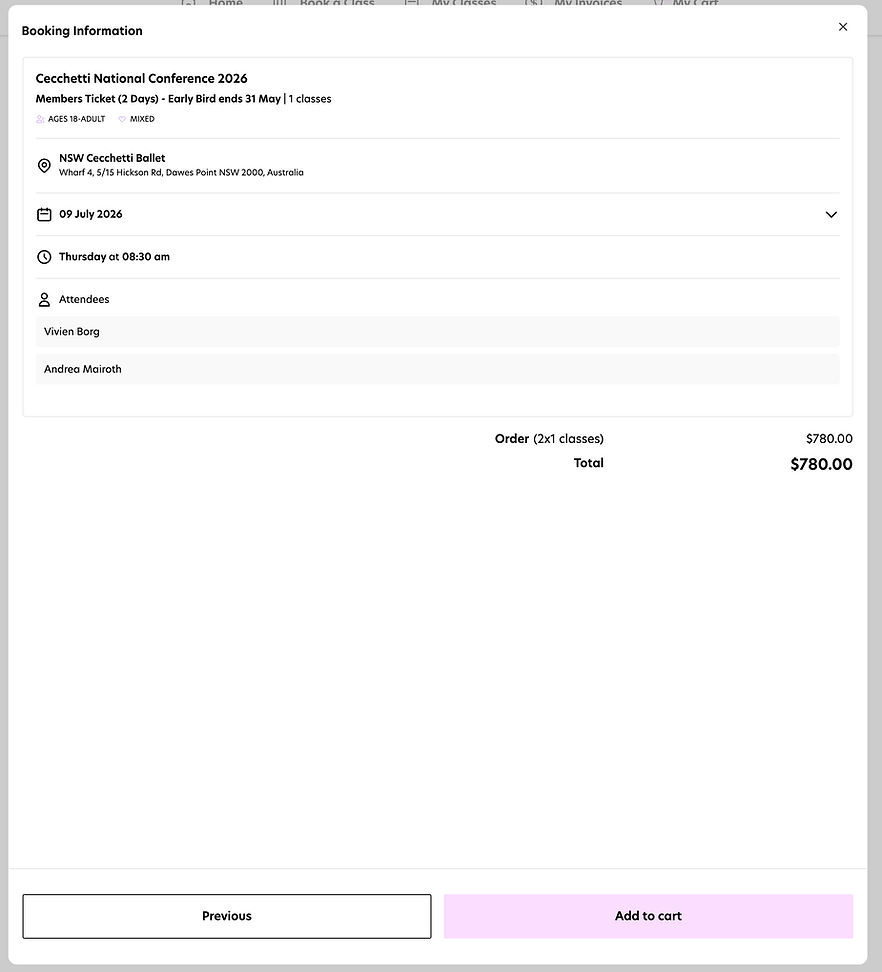
Booking Information
Check that your details are correct and you selected the right ticket.
Click "Add to cart"
Step 8
Cart information
Make sure to click the checkbox for "I agree to ENPNT's release and waiver of liability"

Click "Checkout"
Step 9
Checkout & Payment details
For Checkout we recommend adding your own name for "Enter name of school" and you can add teacher, student or attendee for the Position.

Fill in the Payment details.
Click the check box "I agree to ENPNT's terms and conditions"
Click the "Confirm and pay button"
Repeat the process if you wish to purchase Dinner or Lucie Saronova Medal tickets.
When purchasing Lucie Single class and finals ticket
You'll be prompted at checkout to select which class you plan to attend, i.e. either the Silver or the Gold Class.
